Voopoo Doric 60 Pro, the user manual put into practice
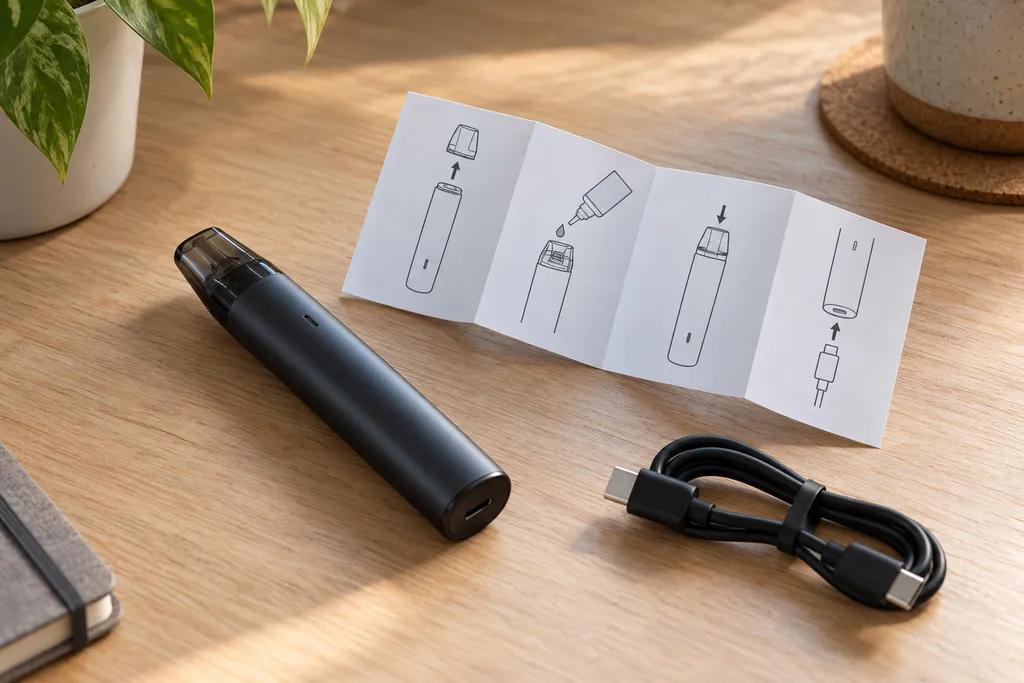
One button, three tiny lights and a ring at the base of the tube. The Voopoo Doric 60 Pro gives very little away about how it works, and the guides circulating online disagree on the colours, the safety cut-offs and how to wake it up when it stops responding. The six-page manual in the box answers most of this. This guide takes it one step at a time, then sets it against the maker’s website and the guides published by retailers.
Voopoo Doric 60 Pro, what the manual says in short
The official manual of the Voopoo Doric 60 Pro comes down to four actions. Five short presses on the button switch the device on or off, three short presses change the power mode, the ring at the base twists to lock it, and three lights show how much charge is left.
| Action | Result according to the manual |
|---|---|
| 5 short presses, device off | switches on, green light |
| 5 short presses, device on | switches off, red light |
| 3 short presses | next power mode, blue, white or red |
| base ring turned left | locked |
| base ring turned right | unlocked |
The rest of the spec sheet is on the maker’s product page, a 2500 mAh built-in battery, 5 to 60 W of output, a 0.1 to 3 ohm resistance range and a PnP X pod. As with the Argus range from the same brand, the coil platform shapes the draw far more than the button does.
Setting up the PnP X pod
Before first use, the manual lists four steps. They matter as much as any setting, and the last one is the most often skipped.
The coil pushes into the bottom of the pod. You then open the filling port, on the side of the pod under a soft plug, and fill it to around two thirds, the level the manual recommends. The pod then goes back onto the battery.
The manual asks you to leave everything to stand for about five minutes, so the cotton can soak, before pressing the button. Airflow is adjusted by turning the metal ring at the top of the pod.
On capacity, the maker lists 5 ml for the standard pod and 2 ml for the TPD version. In the UK, refillable tanks and pods are limited to 2 ml, so the TPD pod is the one that applies here.
Switching on the Doric 60 Pro and choosing a power mode
There is no screen and no wattage dial. Everything runs through a single button and the colour of a light, with two sequences worth remembering.
Five presses to switch on or off
Five quick presses switch the Doric 60 Pro on, and the light glows green. The same sequence switches it off, this time with a red light. That red at the end of a session explains part of the searches about a “red light” on this pod, and it does not always mean a fault.
Three presses to set the power on the Voopoo Doric 60 Pro
Three short presses move from one mode to the next, and each further set of three moves on again. The manual links three colours to three levels, blue for the optimal power, white for the maximum and red for the minimum.
No wattage is given for these modes. Actual power depends on the coil fitted, which the maker rates at 12 to 16 W for the pre-installed 0.8 ohm and 32 to 40 W for the 0.3 ohm in the box. Another language edition of that page gives 12 to 15 W for the 0.8 ohm.
Lock ring and safety cut-off
Two separate mechanisms can block the button. Mixing them up can make it look as if the battery has died.
The base ring
The foot of the device carries a rotating ring. Turned left, it locks the button, turned right, it frees it. The manual notes that the device leaves the box unlocked, and suggests switching it off or locking it before it goes into a pocket or a bag.
The 8-second cut-off
Holding the button for 8 seconds on an unlocked device triggers a protection. The manual says the Doric 60 Pro then locks itself, and that one press on the button unlocks it again. This electronic lock has nothing to do with the ring, which can mislead anyone who only checks the ring position.
Reading the three battery lights
The three dots next to the button double as a fuel gauge. The manual gives three steps.
| Lights on | Charge left |
|---|---|
| 3 of 3 | 66 to 100% |
| 2 of 3 | 30 to 65% |
| 1 of 3 | below 30% |
Charging goes through the USB-C port on the tube. The manual gives no charging time, so none is quoted here. It does list a low-battery protection among the device’s safety features, and the last light on its own is the cue to plug the cable in.
Doric 60 Pro not switching on, what the manual points to
The manual has no fault table, but its instructions cover the simplest causes in a sensible order. They are worth checking before blaming the battery.
- Device switched off, five quick presses, and the light should turn green.
- Ring in the locked position, turn it to the right.
- Safety cut-off triggered, one press on the button frees the device.
- Low battery, a single light, or none, calls for a charge.
- Poor contact, the manual suggests wiping the join between battery and pod with damp paper.
Condensation is the other cause it mentions. A little liquid sometimes condenses on the outside of the pod, which the manual calls unavoidable, and some can end up inside the device. The advice is to take the pod out, turn the device upside down and shake it for a few seconds.
A new coil that tastes burnt may have missed its five minutes of soaking. That is a pod issue, not a fault in the electronics of the Voopoo Doric 60 Pro.
Manual, maker’s website and retailer guides, where they disagree
The manual is not the only document around, and several figures change from one source to another. None of these gaps changes how the device is used, but they explain a lot of confusion.
The first concerns the safety cut-off. Voopoo’s website quotes a 5-second protection, while the manual says 8 seconds and an automatic lock. The website also lists seven protections, whereas the manual names five, without the overheating and maximum power protections.
The second involves the coils. In its parameters, the manual prints “0.3 Ω / 0.6 Ω”, yet the box contents listed by the maker are a 0.3 and a 0.8 ohm, the second one pre-installed. A 0.6 ohm does exist in the PnP X range, but it is not in the box.
The third is about colours. One retailer guide links white to maximum, green to medium and blue to low. Another listing gives white, blue and then red. The manual keeps blue for the optimal power and green for switching on only. The same guide also describes draw activation and a lock after 15 minutes of inactivity, neither of which appears in the manual.
Mismatched listings are not unusual, the same thing happens with the Vaporesso GTX Go 40. When in doubt, the leaflet in the box is the reference for the unit you actually bought.
FAQ
These questions come up around the pod and add to the steps above without repeating them.
Which drip tip fits the Doric 60 Pro?
The drip tip uses the 510 fitting, the most widespread standard for vape tips. The TPD box includes a spare tip designed for direct lung vaping, the draw the 0.3 ohm coil is meant for.
Which pod should you buy for the Doric 60 Pro?
You need a PnP X pod, in the 2 ml version for the UK. The maker describes the device as compatible with the whole PnP X coil series, and the coils push into the bottom of the pod.
Which charger should you use for the Doric 60 Pro?
The manual recommends the USB-C cable supplied by Voopoo and, for charging indoors, a UL certified USB charger. Charging runs at 5 V and 2 A, a figure given both in the manual and on a retailer listing.
How should you store the Doric 60 Pro if it will not be used for a while?
The manual advises charging it regularly so the battery never runs completely flat. It also sets a storage temperature between -5 and 30 °C, away from heat, fire and water.
What should you plan before flying with the Doric 60 Pro?
The manual warns that a pod may leak because of pressure changes in flight, and suggests keeping it away from important items. The carriage rules themselves depend on the airline, so check them before travelling.
Voopoo Doric 60 Pro, start with the manual
The Voopoo Doric 60 Pro takes a few minutes to learn, as long as you follow its own manual rather than the guides doing the rounds. Five presses to switch on, three to change mode, a ring to lock it, and a single press when the 8-second cut-off has locked it.
The gaps between the manual, the brand’s website and retailer listings do not change how the Voopoo Doric 60 Pro is used, but they are a good reason to read every spec sheet with the same care, whatever the hardware.
Further reading
- Argus vape, making sense of the Voopoo range
- Vaporesso GTX Go 40, reading the spec sheet properly
- Small vape, choosing a genuinely discreet kit
Editorial content for adult readers only. Vaping products can contain nicotine, which is a highly addictive substance. Vaping products are not for sale to anyone under 18 in the UK. This article is not a buying recommendation.
Read next
 Hardware
Vaporesso GTX Go 40, reading the spec sheet properly
Vaporesso GTX Go 40 explained, automatic wattage, which GTX coils fit, the 2 ml UK pod and how it differs from the GTX Go 80. Hardware
Geekvape Sonder, what retailer listings tend to mix up
Geekvape Sonder U, Q, Q2 and Q3 compared on battery, power, draw, pod capacity under UK rules and box contents, so retailer listings read clearly. Hardware